GTA 6
Clip Maker
Turn your GTA 6 streams into TikTok clips. AI finds the chases, heists and funny moments in Vice City.
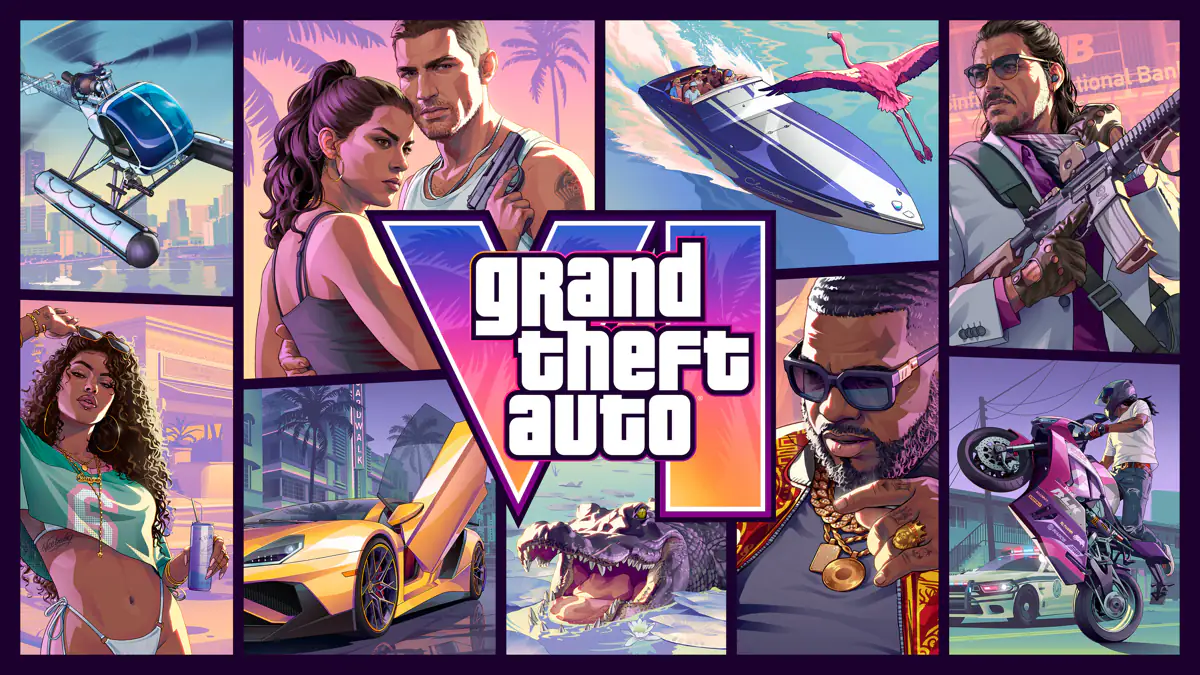
6
layouts incl. facecam & PiP
12 h
longest stream supported
9:16
vertical for TikTok & Shorts
Why Streamers Clip GTA 6 with FragCut
Grand Theft Auto VI Highlights
Tres pasos, cero timeline

01
Pásale una partida
Sube la grabación tal cual o pega el enlace de tu VOD de Twitch.

02
La IA encuentra las jugadas
Kills, aces, clutches y fails. Detección afinada para FPS, funciona con cualquier juego.

03
Publica o descarga
Vertical 1080×1920 en 6 formatos, desde desenfoque y zoom hasta facecam y picture-in-picture. Descarga y publica.
Preguntas frecuentes sobre Grand Theft Auto VI
Respuestas cortas a lo que más nos preguntan. ¿Sigues con dudas? Respondemos los correos en menos de dos días.
Escribir a soporteWhat is a GTA 6 clip maker?
A GTA 6 clip maker watches your recording or Twitch VOD and pulls out the moments worth posting: police chases, robberies, crashes, funny NPC run-ins and your reactions. FragCut cuts each one into a vertical clip ready for TikTok, Reels and YouTube Shorts, so you don't scrub through hours of driving around Vice City.
How do I clip my GTA 6 stream?
1. Stream GTA 6 on Twitch as usual. 2. Paste the VOD link into FragCut, up to 12 hours. 3. FragCut cuts 8 clips automatically, and every other highlight it finds is one click away. 4. On a paid plan, pick a facecam layout, add captions or a title, and download the MP4 or publish it straight to YouTube Shorts. Your first match is analyzed free: pick a 30-minute window and watch every clip it cuts.
Can I clip GTA 6 if I play on PS5 or Xbox and don't stream?
Yes, as long as you have the footage. GTA 6 is out on PS5 and Xbox Series X|S. Save your gameplay with the console's capture button, move the video to your computer, and upload it to FragCut (MP4, MOV, WebM or MKV up to 5 GB). If you stream from your console to Twitch, paste the VOD link instead, which skips the transfer.
Does FragCut work with GTA 6 on PC?
GTA 6 launched on PS5 and Xbox Series X|S, and Rockstar has not released a PC version yet. FragCut works on the footage, not the game itself, so it already handles your console streams and recordings, and it will work the same way with PC recordings when that version arrives.
Can I make a GTA 6 montage?
Yes. On a paid plan, open the montage maker, pick 2 to 20 of your clips, drag them into order and FragCut stitches them into one video. It works well for a best-of from a long session: the first robbery, a wanted-level escape and the craziest crash back to back.
How is this different from the GTA V clip maker?
Same tool, different game. FragCut processes any game you upload. The GTA V clip maker covers GTA Online and GTA RP on FiveM; this page is for GTA 6 streams and recordings.
¿FragCut puede crear clips de Grand Theft Auto VI?
Sí. FragCut es compatible con Grand Theft Auto VI gracias a la detección de highlights con IA. Sube tu video y obtén clips listos para descargar. La IA detecta: Police chases & wanted-level escapes, Robberies and heist missions, Vehicle stunts, crashes & bailouts y mucho más.
¿Qué momentos de Grand Theft Auto VI detecta FragCut?
La IA detecta: • Police chases & wanted-level escapes • Robberies and heist missions • Vehicle stunts, crashes & bailouts • Boat, seaplane & helicopter moments • Funny NPC encounters around Vice City • Story moments with Jason & Lucia • Shootouts & gunfights • Your loudest on-stream reactions.
¿Cuánto tarda en procesar mi video de Grand Theft Auto VI?
El análisis gratuito suele tardar menos de 10 minutos. Renderizar todos los clips lleva de 15 a 30 minutos, según la duración del video. Si importas por URL de Twitch, primero se suma el tiempo de descarga. Recibes varios clips listos para TikTok, Reels y Shorts. Elige formato vertical (9:16) u horizontal (16:9). Subtítulos opcionales.
¿Puedo descargar mis clips de Grand Theft Auto VI?
Sí. Descarga en formato MP4 (H.264, 30fps). Sin marcas de agua en los planes de pago. Todo el contenido te pertenece.
¿Qué formatos de video admite FragCut?
MP4, MOV, MKV y WebM. Sube tu grabación de Grand Theft Auto VI (hasta 5 GB, o pega un enlace de VOD de Twitch de hasta 12 horas) y la IA encontrará los highlights.
Ready to Clip Your Vice City Chaos?
Paste your GTA 6 Twitch VOD and get every chase, heist and reaction back as a vertical clip.
More AI Clip Makers
Valorant
FPS
Counter-Strike 2
FPS
Apex Legends
Battle Royale
Overwatch 2
FPS
Deadlock
MOBA Shooter
Delta Force
FPS
Marvel Rivals
Hero Shooter
League of Legends
MOBA
Fortnite
Battle Royale
Dota 2
MOBA
ARC Raiders
Extraction Shooter
Grand Theft Auto V
Open World
Minecraft
Sandbox
Call of Duty: Warzone
Battle Royale
Rainbow Six Siege
FPS
Escape from Tarkov
Extraction Shooter
Rust
SurvivalGuías para creadores de Grand Theft Auto VI
Guías paso a paso sobre clips desde el blog de FragCut.

How to Clip GTA 6 on PS5 and Xbox (and Turn Clips Into TikToks)
GTA 6 is out on PS5 and Xbox. Here is how to save the moment on either console, get the file to your phone or PC, and turn it into a vertical clip.
Leer la guía →
How to Turn Twitch VODs Into Clips
A repeatable workflow for turning Twitch VODs into vertical clips without rewatching every full stream.
Leer la guía →
AI Clip Maker for Twitch Streamers: What Actually Matters
A working checklist for choosing a Twitch AI clip maker that finds real gaming moments, exports vertical clips, and cuts review time.
Leer la guía →